GUIDE · BEATS · ANY DAW
How to make a tape stop effect.
A tape stop slows the beat down until it stops, like pulling the plug on a turntable. It's the classic transition into a drop or a beat switch. Here's how to do it in any DAW.
By Jordon Lumley, producer and maker of SCRAMBLE. · Nov 2026
Step by step.
With your DAW's stock plugins. The numbers are starting points: trust your ears.
- Pick the moment. Usually the last half bar or bar before a drop or beat switch.
- FL Studio. Gross Beat has tape-stop presets; or bounce the audio and use Edison's or the playlist's time-stretch/pitch with a falling envelope.
- Ableton. Warp the clip in Repitch mode and automate the transpose (or clip gain + pitch) down over the last bar.
- Logic. Use Flex Pitch/Time or the Varispeed and automate it down; or draw a fade with the Speed Fade option on the region.
- Make it smooth. A curved (slow at first, fast at the end) fall sounds more like real tape than a straight line.
- Land the drop. Cut the tape stop exactly on the downbeat, and leave a tiny gap before the drop hits.
Or do it with one free plugin.
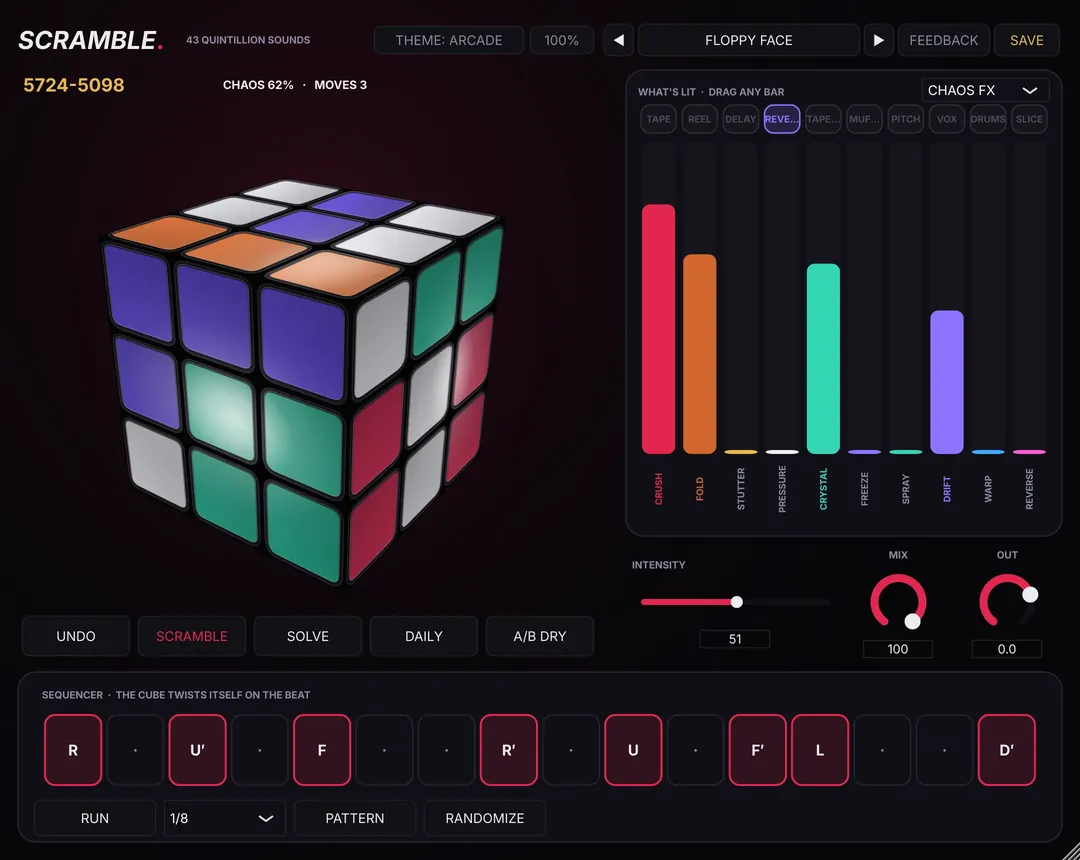
SCRAMBLE's STUDIO mode does tempo-synced tape stops and half-time reels; MORE FX's TIME stops or reverses single 16ths. Automate a twist into the drop. The TRANSITIONS preset pack is a free pack of the week on Dec 7.
Free preset packs every week: see this week's free packs →
SCRAMBLE is free.
SCRAMBLE is a free FX plugin you play like a Rubik's cube: 43,252,003,274,489,856,000 positions, each a different FX chain. It works on drum buses, 808s and bass, hats, loops, vocals and the master bus, not just loops. 237 presets + 10 vocal chains free, Mac + Windows.
Questions
Is there a free tape stop plugin?
Yes. SCRAMBLE is free and its tape stops follow your DAW's tempo. See /free-tape-stop-plugin/.